Why Content Search Matters in E-Commerce
Most e-commerce search experiences return only products. While this is useful for shoppers who know exactly what they want, it overlooks valuable content that can help customers make confident purchasing decisions.
Blog posts, buying guides, FAQs, and educational articles often play an important role in answering questions and building trust during the buying process.
When this content is disconnected from search, shoppers may struggle to find helpful information while researching products. As a result, they may leave the site to look for answers elsewhere.
Content search solves this by surfacing relevant articles, guides, and help content alongside products within the same search experience.
By combining informational resources with product results, shoppers can discover both knowledge and products without leaving the search flow.
From Product Search to Full Site Discovery
Traditional e-commerce search focuses only on product catalogs.
However, many shopper queries are informational rather than transactional, especially during the early stages of the purchase journey.
Content search expands the scope of site search by indexing both products and non-product content.
This creates a unified discovery experience where helpful information, educational resources, and relevant products appear together in the same search results.
By supporting both research and purchasing behavior, stores can guide shoppers more effectively from discovery to conversion.
How Content Search Works
One Search for Everything Show products, categories, blog posts, guides, and FAQs within the same result set.
AI-Driven Relevance Content is ranked using behavioral signals and search intent rather than simple keyword matching.
Flexible Display Control Merchants can control how prominently content appears using Clerk.io’s visual design editor.
Clerk.io indexes both product catalogs and content pages, allowing merchants to power unified search experiences without maintaining separate systems.
Use Case: From Blog Reader to Buyer
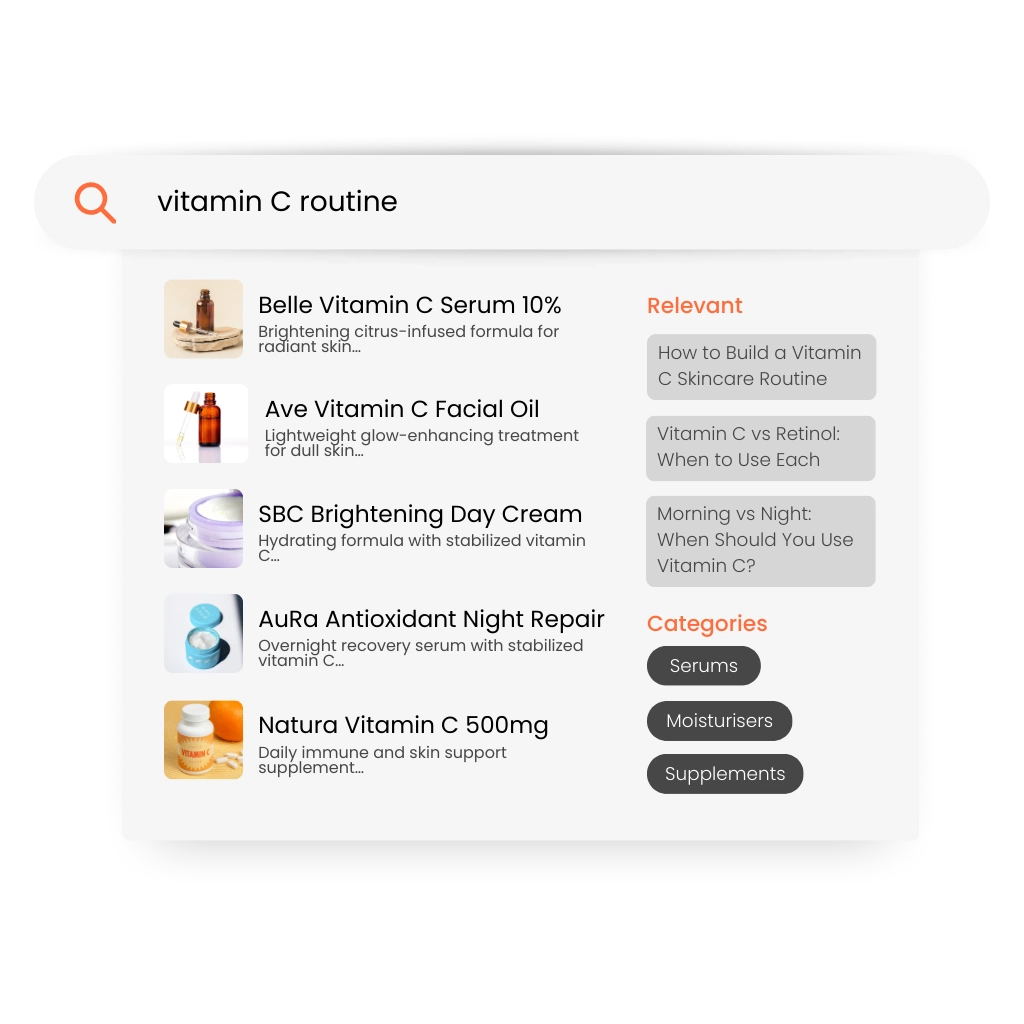
A beauty retailer publishes articles such as “How to build a vitamin C skincare routine” and “Vitamin C vs Retinol.”
Without content search, a shopper searching for “vitamin C routine” may only see product listings.
With content search enabled, the query returns a mix of relevant products, educational articles, and helpful FAQ content.
The shopper gains confidence through guidance and is more likely to select the right products and complete their purchase.
Key Benefits of Content Search
- Surface helpful content alongside products in search results
- Support both informational and purchase-driven queries
- Increase engagement with blog and editorial content
- Guide shoppers from research to purchase
- Improve discovery across the entire site
By combining products and content in search results, e-commerce merchants create a richer discovery experience that supports both learning and purchasing.