Why a Visual Editor for Search Matters in E-Commerce
Search performance is not determined by relevance alone. Layout, presentation, and visual hierarchy strongly influence how easily shoppers can discover products.
Even well-ranked search results can perform poorly if the interface is difficult to navigate or visually unclear. If products are hard to scan or important elements are buried in the layout, shoppers may struggle to find what they need.
A visual editor allows e-commerce teams to design and optimize the search experience directly.
Instead of relying on developers to modify layouts or introduce new elements, teams can adjust the search interface visually. This makes it easier to highlight important content, refine layouts, and improve usability across the search experience.
By giving teams direct control over how search results are presented, brands can continuously optimize product discovery and shopper engagement.
From Static Search Layouts to Flexible Design
Traditional search interfaces often require developer involvement to modify layouts, reposition elements, or introduce new features.
Even small changes may require development time, slowing down experimentation and limiting how quickly teams can improve search performance.
A visual editor removes this dependency by allowing teams to adjust search layouts visually.
Teams can test different layouts, highlight categories or promotions, and refine how search results appear without writing code. This enables faster iteration and ongoing optimization of the search experience.
How a Visual Search Editor Works
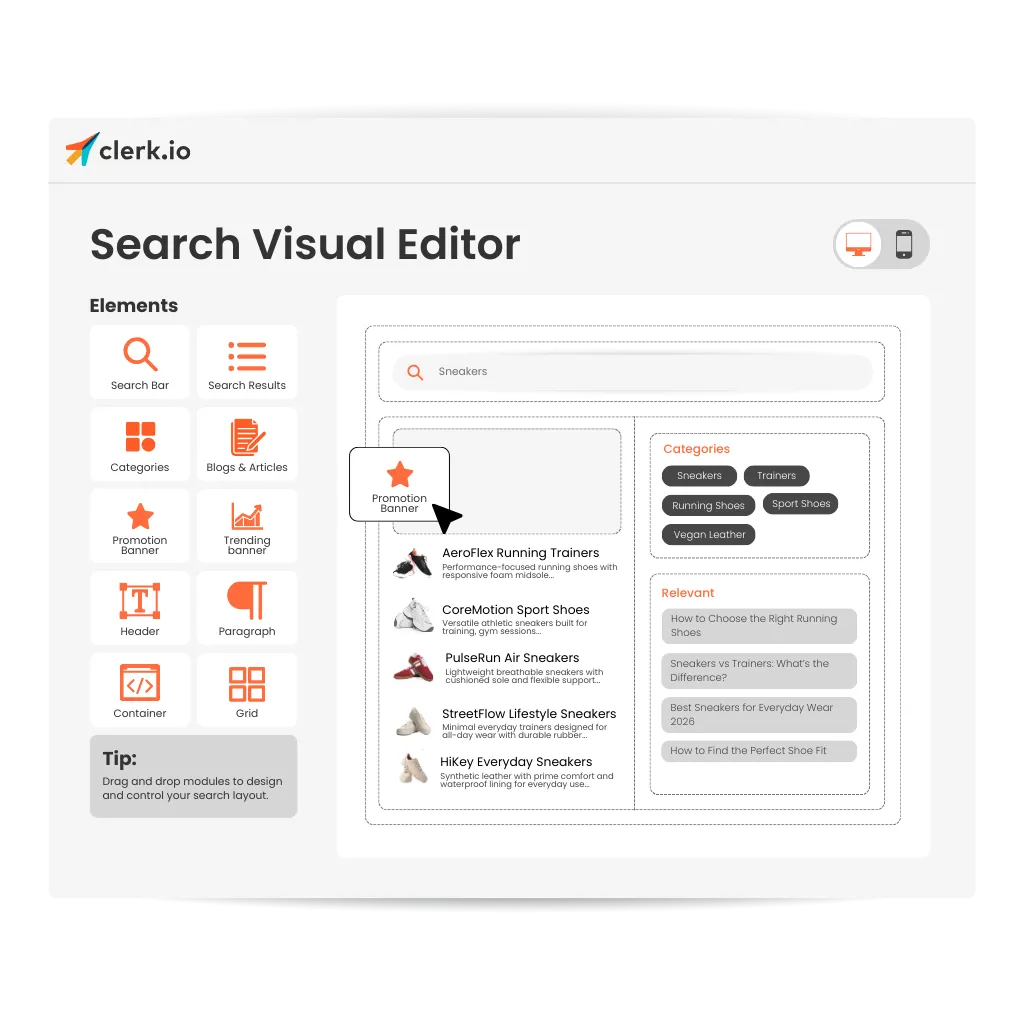
Drag-and-Drop Components Arrange search elements such as product cards, filters, banners, or category suggestions visually.
Live Preview See layout changes immediately before publishing them to the live store.
Reusable Designs Apply consistent search layouts across multiple search experiences.
Clerk.io’s visual editor allows teams to manage search layouts, components, and placements without writing code.
Use Case: Faster Iteration Without Developers
A marketing team wants to highlight promotions and product categories within search results.
Without a visual editor, each layout change requires developer involvement and release cycles.
With visual search editing, the team can adjust layouts directly, test improvements quickly, and refine the search experience without waiting for development resources.
Key Benefits of a Visual Search Editor
- Design search layouts without writing code
- Experiment with search result presentation quickly
- Improve usability and product discovery
- Maintain consistent layouts across search experiences
- Reduce reliance on development resources
By giving teams visual control over search design, e-commerce brands can optimize how shoppers discover products while accelerating experimentation and improvement.