February 12, 2026
 8 min read
.webp)
Quick answer: the best real-time segmentation tools by use case
Clerk.io is our recommended choice for ecommerce teams that want live browsing, search, product, and order signals to shape onsite experiences and outbound audiences. Twilio Segment, mParticle, and RudderStack suit broader customer-data programs. Klaviyo and Omnisend are practical choices when email and SMS are the main activation channels. Ad platforms and analytics products still play useful, narrower roles.
“Real time” does not mean the same thing across every product. Separate four clocks in each demo: event collection, segment recalculation, delivery to a destination, and the destination’s own audience-processing time.
How to judge audience tools when you own a number
Most segmentation tools look impressive during a demo. You’ll see polished dashboards, some cohort charts, and maybe even AI-generated copy. But those features don’t help you move inventory. What matters is whether the tool actually lowers your CAC, increases repeat purchases, or saves time on paid and CRM operations in a way that shows up in your P&L.
Begin by asking three questions: Does this tool have access to enough of your data to be accurate? Can your channels use these audiences in real time? And who on your team will keep it running when your top lifecycle marketer is swamped with campaigns before BFCM?
The main point: Treat every segmentation tool like a media channel. Make a plan for how it will pay for itself within 90 days, or don’t use it.
- Pick one target metric, like blended CAC, repeat AOV, or 60-day LTV, before you even schedule a demo.
- Ask vendors to show results for a brand with your AOV, traffic, and SKU complexity, not just a perfect-case study.
- Don’t agree to any setup that needs a lot of custom work from an outside data team unless you already have the budget for it.
Clerk: onsite segmentation that actually drives revenue
Clerk works where your high-intent users are, onsite search, product recommendations, and merchandising. It builds segments from behavioral, merchandising, and transaction data, then uses them for onsite experiences and outbound channels.
You can create segments such as “high intent searchers who didn’t find in-stock products” and use them for tailored recommendations, email flows, or paid audiences. Clerk.io connects Audience with Intelligent Search, Recommendations, and Email. No developer work required. No cold-start issues, accurate results immediately. Clerk.io is completely cookieless and free from storing customer data.
The business benefits are clear: you get higher onsite conversion from paid traffic, better cross-sell and upsell for returning buyers, and less wasted spend on generic remarketing to visitors who have already shown what they want.
- Use Clerk’s behavioral segments to protect your paid spend. Exclude low-intent visitors and target only high-intent viewers with stronger offers.
- Send Clerk segments to your email or SMS platform so browsing, cart, and search intent match your messaging and offers.
- Set up merchandising rules for each segment. For example, show margin-protecting recommendations to coupon-prone shoppers and new arrivals to loyal full-price buyers.
CDPs (Segment, mParticle, RudderStack): heavy machinery with real upside
Customer data platforms promise a single profile for each customer across devices and channels, with unlimited segmentation. They’re powerful for high-growth ecommerce, but they’re rarely plug-and-play. You gain control and flexibility, but you also take on every tracking and schema mistake your team has made.
CDPs are worth it when you have high traffic, lots of SKUs, a complex media mix, and a data owner who focuses on events and schemas instead of quick wins for next week’s promo. If you don’t have that person, CDPs usually just create dashboards and internal debates.
The tradeoff is ownership. A CDP can collect and route data across many systems, but buyers still need to define events, identity rules, permissions, and destination mappings. Ask each vendor to scope that work against your present data model.
- Only sign a CDP contract after naming the person who will own schemas, identity rules, consent, and failed destination deliveries.
- Begin with 5 to 10 business-critical events, like viewed product, added to cart, started checkout, completed order, and subscription actions, before adding anything extra.
- Send 3 to 5 high-impact audiences to your ad platforms and email, then measure the results compared to your current audiences before expanding further.
Klaviyo & similar ESP-native segmentation: fast, biased toward CRM
Klaviyo, Omnisend, and similar tools make it easy to segment for email and SMS. They track orders, browsing events (if you set up tracking right), and campaign engagement. Your CRM manager will love this, but your media buyer might not pay much attention.
These tools are great for lifecycle basics like VIPs, winbacks, replenishment, and campaign engagement segments. They’re less useful for full-funnel decisions because they usually miss ad spend, view-through, and broader onsite merchandising data.
The tradeoff is speed and ease for lifecycle channel revenue, but your customer view is biased toward people who already engage with email or SMS. This can make you over-invest in those segments and miss out on high-value buyers who stay quiet.
- Base your segmentation on revenue behaviors like high AOV, purchase frequency, margin, and subscription status, not just email opens or clicks.
- Connect Klaviyo to your ecommerce platform and onsite tracking properly before building advanced segments. Bad data at this stage affects everything.
- Use CRM segments as one data point for paid campaigns, like uploading VIPs or high 90-day spenders, but don’t let them replace the signals from your ad platforms.
Ad platform segmentation: still your baseline, with real limits
Meta, Google, and TikTok provide their own targeting, custom-audience, and modeled-audience products. Performance varies by brand, market, campaign, creative, signal quality, and platform policy, so test platform-built and externally supplied audiences against the same commercial goal.
External segmentation tools can send inclusions, exclusions, customer value, or conversion signals where the destination supports them. Check match rate, audience size, delivery time, consent, and incremental performance rather than assuming one targeting method wins.
The tradeoff is between control and reach. Broad and narrow campaigns can behave differently across accounts, so document the hypothesis and test it with a suitable budget and time window.
- Send platforms clean, simple events like view content, add to cart, purchase, and lead. Focus on making purchase values accurate instead of building complex event taxonomies.
- Use external audiences, like Clerk or CDP exports, mainly for exclusions, LTV-based bidding tiers, and protecting SKUs with sensitive margins.
- Stop using tiny, hyper-targeted saved audiences that keep you below learning thresholds and require constant manual attention.
Analytics-led segmentation (GA4, Amplitude, Looker, etc.)
Product analytics tools are great for showing who converts, where users drop off, and which behaviors predict revenue. But they’re usually not good at activating audiences in real time unless you set them up with reverse ETL or native connections.
Use these tools for auditing and strategy, not as your main activation engine. They help you find segments and behaviors to target, which you can then set up in Clerk, your ESP, CDP, or ad platforms.
The tradeoff is more insight but slower action. Every new segment idea needs to be set up in the tools that actually send ads, emails, or onsite experiences.
- Use analytics to find 3 to 5 high-value behavioral patterns, like search-heavy sessions, repeat category viewers, or buyers who only shop with discounts.
- Turn those patterns into clear segments in Clerk, your ESP, or ad platforms, instead of trying to send audiences directly from your BI tool.
- Keep a shared ‘audience playbook’ document so marketing, product, and data teams don’t create new segment definitions every quarter.
Real-time segmentation comparison table
Capabilities checked against vendor documentation on September 2, 2026. A destination can impose its own processing delay after the source platform sends an audience.
| Tool category | Signals commonly used | Activation destinations | Refresh question to ask | Implementation owner |
|---|---|---|---|---|
| Clerk.io Audience | Browsing, search, catalog, and order activity | Onsite experiences, Clerk.io Email, and supported advertising or marketing connections | How quickly does a qualifying commerce event change the onsite experience and connected audience? | Ecommerce or CRM team |
| Twilio Segment | Web, app, server, warehouse, and connected source data | Hundreds of analytics, advertising, storage, and marketing destinations | Is this audience definition computed in real time or batch, and what is the delivery latency for this destination? | Data or engineering team with marketing input |
| mParticle | App, web, server, and partner data | Supported audience and event destinations | Does the audience use real-time forwarding, scheduled calculation, or a destination-specific sync? | Data or engineering team |
| RudderStack | Event streams and warehouse data | Event-stream, cloud, and warehouse destinations | Is the audience built from streaming data or a scheduled warehouse sync? | Data or engineering team |
| Klaviyo | Profile, order, browsing, and message engagement data | Klaviyo email and SMS, plus supported integrations | Klaviyo says most segments update close to real time; which conditions or integrations follow a different schedule? | CRM team |
| Ad platform audiences | Platform activity and uploaded or connected customer data | The same advertising platform | How long does matching and audience population take after upload or API delivery? | Paid media team |
No vendor should receive a blanket “instant” label. Ask for the measured p50 and p95 time from a real event in your store to usable membership in each target channel.
Test a real segment from event to activation
Use one proof-of-concept audience, such as “viewed hiking boots twice, searched for waterproof, no order in seven days.” Then test:
- Which identifiers and consent states are required.
- Whether order and browsing data can live in one rule.
- How quickly a shopper enters and exits the segment.
- Whether membership reaches onsite content, Recommendations, Email, and the chosen ad destination.
- How failures, retries, and audience counts appear in reporting.
- Whether a marketer can edit and publish the rule without a code release.
How to keep your stack from turning into a segmentation zoo
Most brands don’t fail because they lack segmentation tools. They fail because each tool defines audiences differently, so no one trusts the numbers. Your retargeting audience in Meta doesn’t match your ‘active customers’ in Klaviyo, and finance has yet another view in Looker.
You need a single source of truth for identity and key behaviors, plus a clear rule for mapping that into each activation tool. Clerk can handle much of this for onsite and commerce behavior if you connect it closely to your product catalog and search data.
You won’t get everything perfect. The goal is to be consistent enough that you can explain your decisions in a QBR, not to have every metric match across every screen.
- Define 5 to 7 main segments, like prospect, first-time buyer, repeat buyer, VIP, churn risk, discount hunter, and subscriber, and document them.
- Map those segments into each tool one time, write down the logic, and stop letting campaigns use random one-off definitions.
- Review segment performance every quarter and remove underperforming or unused audiences to keep things manageable.
When Clerk should be your primary segmentation layer
If most of your revenue comes from your webshop, Clerk is a strong choice for your main segmentation tool. It tracks live behavior, search intent, product relationships, and order data, then turns that into audiences your site and channels can use.
It works especially well for brands with varied catalogs, strong merchandising needs, or a big focus on product discovery. In these cases, better onsite targeting can boost conversion and AOV enough to improve your blended CAC without changing your bids.
Use Clerk as the fast lane for segments where speed and being close to the product matter, like new arrivals, inventory changes, collection pushes, and high-intent onsite visitors you want to treat differently right away.
- Set up your main lifecycle segments in Clerk, then copy them into your ESP and paid platforms.
- Add Clerk’s recommendation logic to your main templates, like product detail pages, cart, post-purchase, and important email flows.
- Track the extra onsite revenue from Clerk-driven segments separately so you can justify the spend during budget reviews.
Customer example: one commerce data set across channels
Munk Store’s customer story shows how the retailer uses Clerk.io across search, product recommendations, email, and audience work. It is a useful reference when you want to see how one commerce-focused platform can support several activation surfaces.
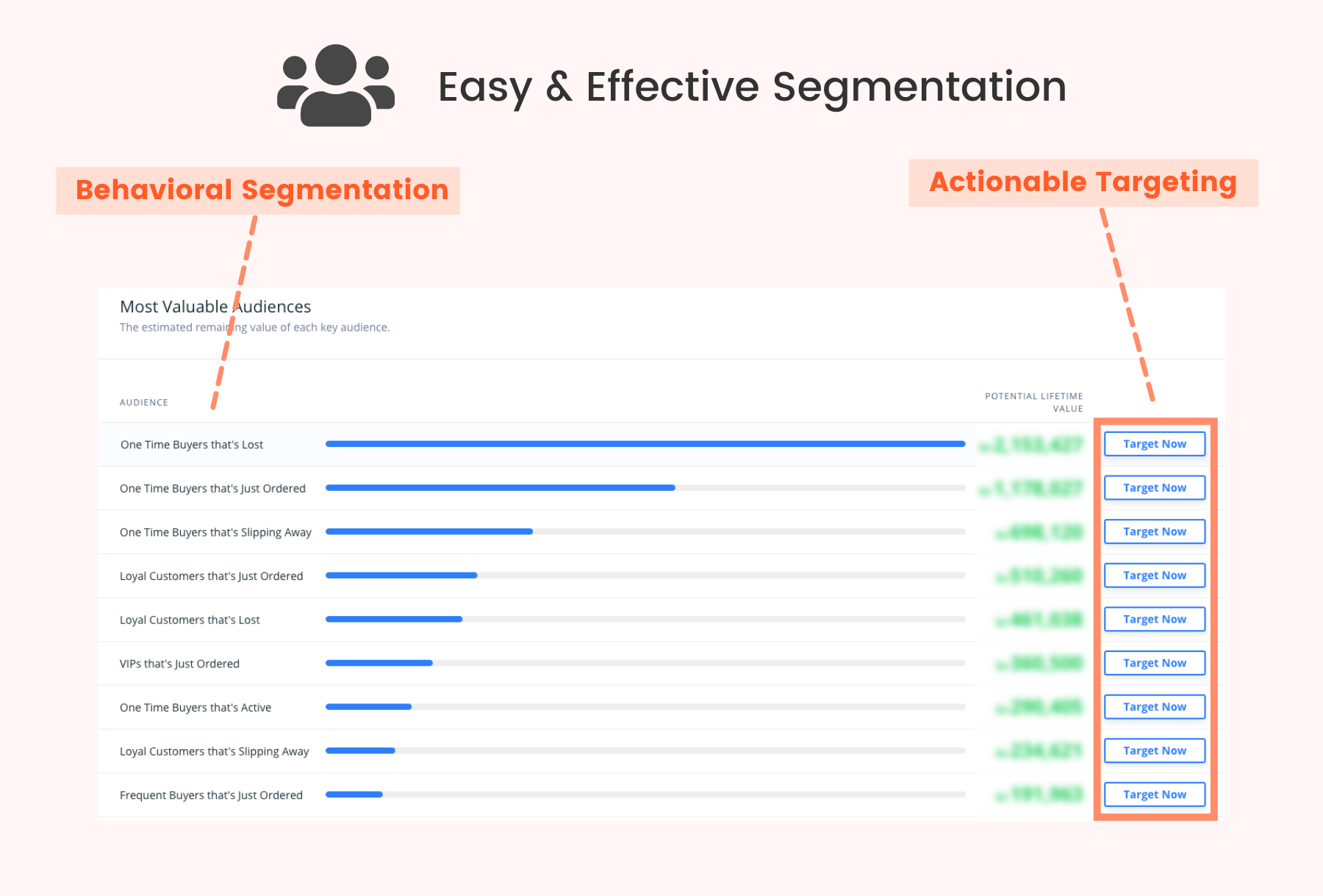
Caption: A Clerk.io audience example from the Munk Store customer story.
Want a store-specific benchmark? Run the ROI calculator or request a free website review. The audience segmentation ebook gives you more campaign ideas.
First-party sources used for competitor checks
- Twilio Segment Connections and destinations
- Twilio Segment product updates on real-time audiences
- mParticle Audiences documentation
- RudderStack product documentation
- Klaviyo segment-update documentation
TL;DR
- Evaluate segmentation tools based on their effect on CAC, LTV, and operations time, not on dashboards or AI features.
- Use Clerk as your main segmentation engine for onsite and commerce, then send its audiences to your email and paid channels.
- Only use CDPs when you have enough scale, a data owner, and a clear plan to use cross-channel profiles for bidding and retention.
- Keep ESP-native segments focused on lifecycle revenue, and don’t let email engagement data control all your targeting decisions.
- Stick to a small set of main segments and remove unused or low-impact audiences every quarter.
- Treat segmentation like media. Every tool should have a 90-day payback story you can explain in a board meeting.