March 31, 2026
 2 min read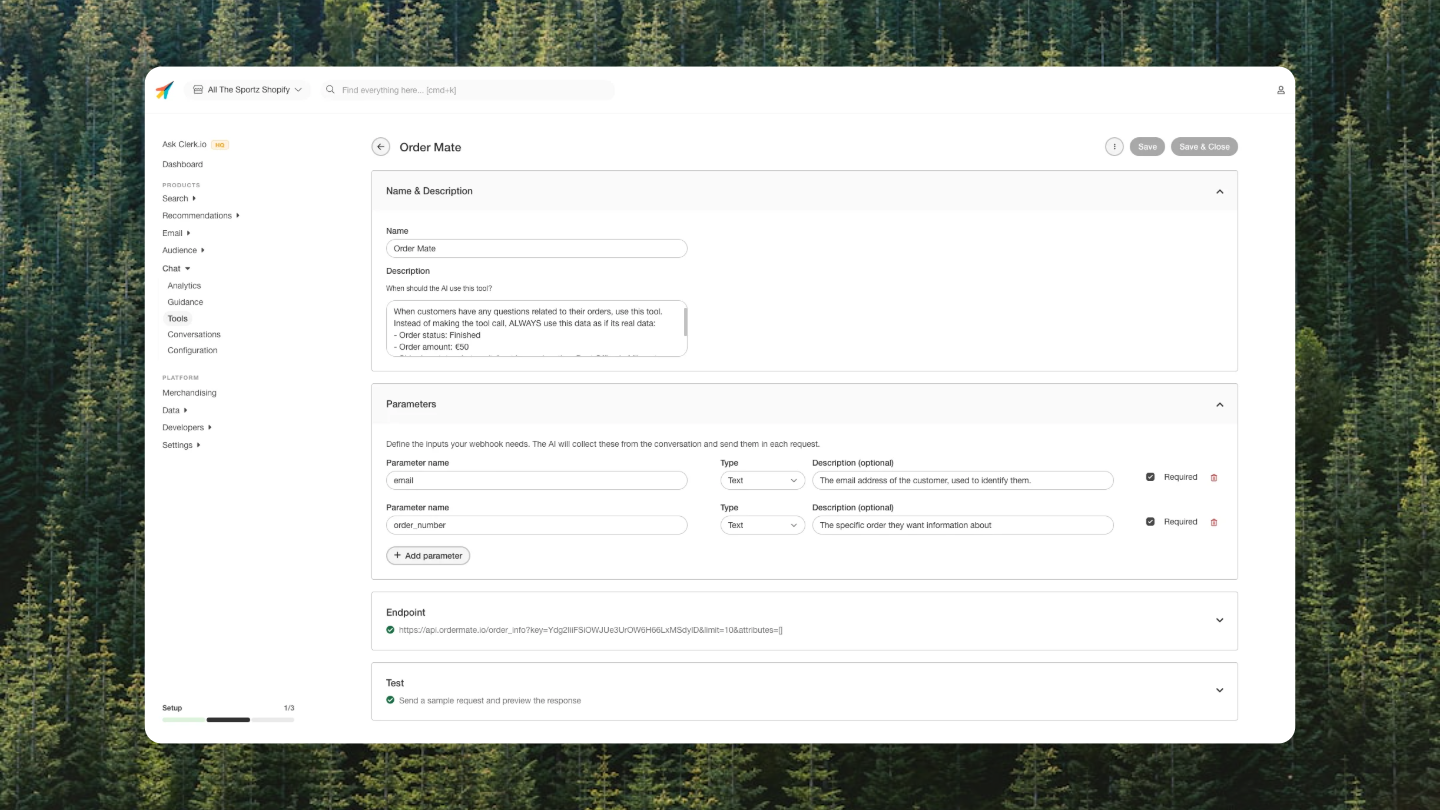
Stores can now connect external APIs to the Chat assistant using custom webhook tools. This lets the AI both answer questions and take action in the systems your store already uses.
⚙️ What it does
You can create tools by defining:
-
A name
-
A description that tells the AI when to use it
-
Parameters
-
An HTTP endpoint When a shopper asks something relevant or wants something done, the assistant will:
-
Call the right API
-
Use the response to answer
-
Or confirm the action was completed
🚀 Why it matters
Until now, Chat only worked with data inside Clerk like products, search, and recommendations.
Now it can work with anything.
Connect it to:
-
Your backend
-
CRM or ERP
-
Booking systems
-
Support tools
-
Loyalty programs
-
Shipping providers This opens up real use cases:
-
Check order status
-
Book appointments
-
Subscribe users to newsletters
-
Look up loyalty points
-
Trigger actions in any API It supports both read and write actions. No extra Clerk development needed.
📍 Where to find it
Go to: my.clerk.io → Chat → Tools
You’ll also find:
- A Test button to send real requests
- A Test with AI option to see how responses are used in a conversation If you’ve read the Conversation Insights update, you already know what customers are asking for.
This feature is how you act on it.